Showing posts with label BADI. Show all posts

Monday, April 14, 2008

Defining a BADI

An application developer who wishes to have a Business Add-In in a particular program defines the interface for an enhancement in the Business Add-In Builder. In the following step, he or she programs the interface call in the application program at the appropriate place. Customers can then select the add-in and implement it according to their needs.

Procedure
1. From the SAP menu, choose Tools ® ABAP Workbench ® Utilities ® Business Add-Ins (transaction SE18).

We would like to explain the procedures using an application program as an example. There is a string conversion in the program. You want the add-in users to determine themselves how their strings are to be converted. The application developer defines an enhancement. It consists of an interface with a method. A changing parameter is used to pass on the string.

Option: Within SAP
Meaning: If the customer selects this option for an Add-In, he or she has no option for creating his or her own implementations for this Business Add-In or for using them. In the input help, Business Add-Ins with this flag are not displayed. For more information on the checkbox Within SAP, refer to the section Definition of a Business Add-In in the Enterprise Core.

Option: Multiple Use
Meaning: The Business Add-In can be set for multiple use. For more information, refer to the section Multiple-Use Business Add-Ins.

Option: Filter-Dependent

Meaning : The implementation of a Business Add-In is dependent on a particular filter value.For more information, refer to the section Multiple-Use Business Add-Ins.
None of the above options is selected.
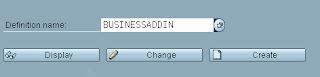
2. Enter a name with a maximum of 20 characters for the Business Add-In.


3. Choose Create.
4. On the following screen, enter a short text as the description for the Business Add-In.In this example, we are dealing with a simple enhancement.
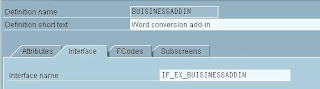

Under the FCodes tab, you can create Menu Enhancements, and under the Subscreens tab you can create Screen Enhancements.

5. Choose the Interface tab. The interface name is generated automatically and can be changed here.

6. Double-click the interface name field. The system branches to the Class Builder.

7. Confirm that you want to save the entries you have made. Assign a package to the Business Add-In.

8. Use the Class Builder to assign a method to the interface.
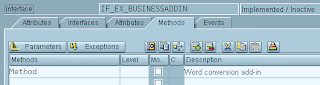

9. Now define a parameter with the following attributes:


10. Save and activate your entries. Use the pushbutton Back to navigate back to the Business Add-In definition.

You can now continue with the definition of the Business Add-In by executing activation in the Class Builder.
A table control now appears on the definition screen for the Business Add-In. It displays the method you have created for the interface.
When you maintain the interface methods, the corresponding executing class is generated. The generated code cannot be altered in the initial expansion phase.

11. Save your entries and use the Documentation pushbutton to create a description for your new Business Add-In. Remember that this documentation is very important for users to be able to understand the purpose behind the Add-In. For more information, read the section Documentation of a Business Add-In.

Choose Goto -> Default Coding / Sample Coding if you wish to create default coding and/ or sample coding for the Business Add-In. The default implementation is executed only if no other active implementation is available. This applies also to filter-dependent Business Add-Ins.

When you create default or sample coding, do not forget to save your entries. In this way, the connection between the class and the implementation is set up.

Calling a Business Add-In in your Program

When you define a Business Add-In, enhancement management generates a class that implements your interface. The application developer uses a factory method to create an instance of this adapter class in the application program and calls the corresponding method, if necessary.
The adapter class method generated by add-in management decides whether one or several active implementations should be called. If necessary, these implementations are subsequently executed. The application program ensures only that the adapter class method is called. The application program does not know which implementations are called.

Example:

Having created a string conversion Business Add-In, you would program the call of the Business Add-In into your ABAP source code as follows:

1 Report businessaddin.
2 class cl_exithandler definition load. "Declaration
3 data exit type ref to if_ex_businessaddin. "Interface reference
4 data word(15) type c value 'Business Add-in'. "String to change

5 start-of-selection.
6 call method cl_exithandler=>get_instance "Factory method call
7 exporting "Method
exit name =’BUSINESSADDIN’
8 null instance accepted =’X’
9 changing instance = exit.
10 write:/'Please click here'.

11 at line-selection.
12 write:/ 'Original word: ',word.

13 if not exit is initial.
14 call method exit->method "Add-In call
15 changing parameter = word.
16 endif.
17 write:/ 'Original word: ',word.

In order to be able to call static methods, you must declare the corresponding class in ABAP Objects. This is why the class … definition load statement is necessary for the factory class.
A variable for object reference is also necessary when calling the method. Use data to create it and type it to the interface.

During initialization (line 6), the application developer creates an adapter class instance using the factory method. The instance methods are then called at the time specified.

To improve performance during creation of the instances, you should specify additional parameters for the call in the method GET_INSTANCE of the class CL_EXITHANDLER.
EXIT_NAME: The name of the BAdI definition is assigned to this parameter.

NULL_INSTANCE_ACCEPTED: Whenever the value X is assigned to this parameter, no instance is created if there are no active implementations for this BAdI definition. In this case, the INSTANCE parameter has the value NULL. Using this parameter implies that the method calls of this BAdI may only be called under the condition that this instance is not NULL. The query if not is initial. is necessary in this case.

Notes on Usage
The instance generated through the factory method should be declared as globally as possible or generally be passed as a parameter to ensure that the initialization process must be run as rarely as possible – just once would be best. In no case should you discard the instance as soon as it is generated or repeatedly run the initialization process in a loop.

Within the adapter class interface, required database accesses are buffered locally, so that each access is executed once only. However, repeated initialization makes the buffer useless and dramatically reduces performance.

Due to the local buffering, you can call Business-Add-In methods without having to expect considerable performance restrictions, even if no active implementations exist.

Also, if the definition of the Business-Add-In is filter-dependent, a single instance is sufficient.
However, you should not do without initialization altogether. Even if you could call static methods of the implementing class of the Business-Add-In implementation without an instance, you would lose the benefit of performance improvement through the Business-Add-Ins and the possibility of multiple use. If you switch the method type in the interface from the static method to the instance method at any time in the future, many code adjustments are required. In addition, you can no longer use default code that is provided

Business Add-Ins: Import Procedure

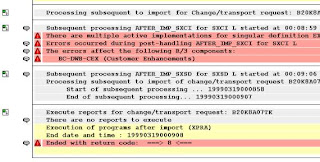
Conflicts can occur at release upgrade or when transporting a Business Add-In within a system infrastructure containing multiple levels (country versions, industry solutions, partners, etc.). Possible collisions include:

Case 1 : Multiple active implementations exist for Business Add-Ins that have not been designed for multiple use (for the same filter value, if add-in is filter-dependent).
Case 2 : Identical interfaces were assigned during Business Add-In definition.
Case 3 : Identical function codes were assigned during Business Add-In definition.
Whenever such collisions occur, corresponding error messages and warnings are created in the transport log at import. Their long texts provide you with information on how to proceed.

If the collision described in case 1 occurs in your system, proceed as follows

1. Choose Utilities -> Adjustment -> Multiple active implementations (in transaction SE18).
A list appears displaying your Business Add-Ins. A red traffic light indicates that multiple active implementations exist for that add-in.
2. Deactivate these implementations using the appropriate pushbutton or double-click on the name of the implementation to branch to the corresponding transaction where you can then correct the problem

In cases 2 and 3, proceed as follows:

1. Choose Utilities -> Adjustment -> Multiple assigned interfaces or Multiple function codes assigned.
Both of these menu options display an overview; the Add-Ins in question are marked with a red traffic light.
2. The people responsible for those add-in definitions where identical interfaces and function codes occur must now decide how to proceed. To delete a function code or change an interface name, call the ABAP Workbench and use the appropriate pushbutton to call the tool you need. A new transport may be necessary.
Sorting BAdI Implementations

Use
The sequence for execution of BAdI implementations can be controlled for BAdIs used on a multiple basis by a sort mechanism.
Procedure
In the BAdI Builder (SE18), choose Utilities -> Sort.
Choose Standard Sort if sorting is to take place using numeric sort values. The numeric values are entered in the displayed field Layer Value when you create the implementations and stored in a table. The implementations are executed in accordance with the specified sequence.
Choose Special Sort if sorting is to take place using non-numeric sort values. In this case, you need to enter the name of the implementation that will be created in the following step.
Proceed as follows if you require special sorting:
1. Create an implementation for the BAdI definition BADI_LAYER contained in the delivered product. Enter a BAdI definition as filter value in the Properties tab (the name will be used as a dummy value to begin with).
2. Create a screen (in a function group or a module pool). The screen contains, for example, a text field with the name Sort Value and an input field.
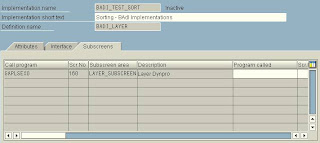
3. Choose the Subscreens tab of the BAdI implementation and enter the called program and the screen number.


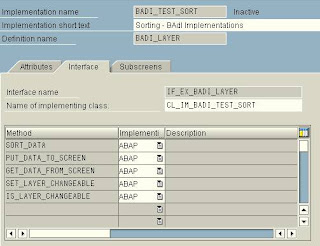
4. Choose the Interface tab. The IF_EX_BADI_LAYER interface contains the following methods:


In addition to methods for data transmission of the sort value and for changing the BAdI implementation, the interface also contains a sort method that sorts a table of values in any specified order.


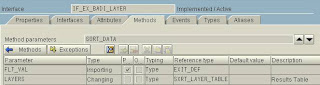
A standard table is passed to this method as a changing parameter. The table contains values only; it does not contain any implementation names.
This table contains, for example, inputs for the Sort Value field when you create implementations. The user can maintain any fields as required and sort them according to any specified criteria at runtime.

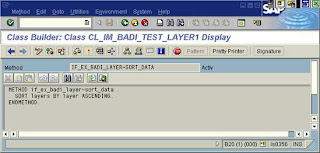
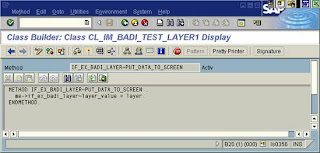
5. Program the method SORT_DATA. Here is an example of simple sorting of numeric values:


6. Program the methods for data transmission in the following form


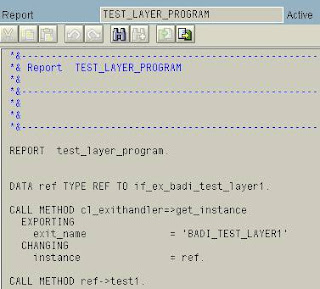
7. Program the call for implementations from the application program. The IF_EX_BADI_LAYER interface contains a parameter-free method called TEST for test purpose.


The implementations are executed (for example, in numeric sequence).
Switching Off Sort Function

To switch off the sort for the execution of BAdI implementations, choose Utilities -> Sort and finally No Sort. The implementations will now run in an arbitrary sequence in this case. The edit field that was displayed using a subscreen during the execution of a BAdI implementation now disappears.
Sorting of BAdI implementations can be switched on again at any time. This does not count as a modification to the standard version. The BAdI definition is not changed. Switching off or making a change, on the other hand, counts as a modification.

BADI - Business Add-Ins

Business add-ins are enhancements to the standard version of the system. They can be inserted into the SAP System to accommodate user requirements too specific to be included in the standard delivery. Since specific industries often require special functions, SAP allows you to predefine these points in your software.


As with customer exits, two different views are available:

· In the definition view, an application programmer defines exit points in a source that allow specific industry sectors, partners, and customers to attach additional coding to standard SAP source code without having to modify the original object.

· In the implementation view, the users of Business Add-Ins can customize the logic they need or use a standard solution if one is available.

In contrast to customer exits, Business Add-Ins no longer assume a two-level infrastructure (SAP and customer solutions), but instead allow for a multi-level system landscape (SAP, country-specific versions, industry solutions, partner, customer, and so on). You can create definitions and implementations of Business Add-Ins at any level of the system landscape.
SAP guarantees the upward compatibility of all Business Add-In interfaces. Release upgrades do not affect enhancement calls from within the standard software nor do they affect the validity of call interfaces. You do not have to register Business Add-Ins in SSCR.
The Business Add-In enhancement technique differentiates between enhancements that can only be implemented once and enhancements that can be used actively by any number of customers at the same time. In addition, Business Add-Ins can be defined according to filter values. This allows you to differentiate between Add-In implementations using the filter Country or other criteria.

All ABAP sources, screens, GUIs, and table interfaces created using this enhancement technique are defined in a manner that allows customers to include their own enhancements in the standard. A single Business Add-In contains all of the interfaces necessary to implement a specific task.
In order to enhance a program, you must first define a Business Add-In. The application developer creates an interface for the add-in. From this, enhancement management creates an adapter class that implements the interface and thus provides the interface for implementation by the customer, partner, and so on. The developer then creates an instance of the adapter class in the application program and calls the corresponding method at the appropriate time.


For each Business Add-In you have one interface and an adapter class that implements this. The interface is implemented by the user.
The generated class (Add-In adapter) has the following tasks:
· Control

The adapter class calls the active implementations.
1. · Filtering
If a Business Add-In is to be executed only under certain conditions, the adapter class ensures that only certain implementations will be executed.

This concept ensures mutlple use. Any Business Add-In that has been implemented once already can be implemented again by those groups listed to the right of the software chain shown in the above graphic.
Customers can find the enhancements in their system in the Implementation Guide (IMG) and in the component hierarchy. If a customer wishes to use a Business Add-In, he or she first creates an implementation. The customer must implement the methods and the enhancements, and afterwards activate the implementation of the enhancement. The enhancement's active components are then called at runtime. Normally, a Business Add-In contains an interface and other additional components such as function codes for menu enhancements. In some cases, Business Add-Ins also include enhancements for screens. The enhancement, interface, and generated classes are all located in the appropriate application development namespace. Business Add-In implementations are created in the respective implementation namespace.

BADI vs User Exit

Business add-ins are enhancements to the standard version of the system. They can be inserted into the SAP System to accommodate user requirements too specific to be included in the standard delivery. Since specific industries often require special functions, SAP allows you to predefine these points in your software.


As with customer exits, two different views are available:

· In the definition view, an application programmer defines exit points in a source that allow specific industry sectors, partners, and customers to attach additional coding to standard SAP source code without having to modify the original object.

· In the implementation view, the users of Business Add-Ins can customize the logic they need or use a standard solution if one is available.

In contrast to customer exits, Business Add-Ins no longer assume a two-level infrastructure (SAP and customer solutions), but instead allow for a multi-level system landscape (SAP, country-specific versions, industry solutions, partner, customer, and so on). You can create definitions and implementations of Business Add-Ins at any level of the system landscape.
SAP guarantees the upward compatibility of all Business Add-In interfaces. Release upgrades do not affect enhancement calls from within the standard software nor do they affect the validity of call interfaces. You do not have to register Business Add-Ins in SSCR.
The Business Add-In enhancement technique differentiates between enhancements that can only be implemented once and enhancements that can be used actively by any number of customers at the same time. In addition, Business Add-Ins can be defined according to filter values. This allows you to differentiate between Add-In implementations using the filter Country or other criteria.

All ABAP sources, screens, GUIs, and table interfaces created using this enhancement technique are defined in a manner that allows customers to include their own enhancements in the standard. A single Business Add-In contains all of the interfaces necessary to implement a specific task.
In order to enhance a program, you must first define a Business Add-In. The application developer creates an interface for the add-in. From this, enhancement management creates an adapter class that implements the interface and thus provides the interface for implementation by the customer, partner, and so on. The developer then creates an instance of the adapter class in the application program and calls the corresponding method at the appropriate time.

For each Business Add-In you have one interface and an adapter class that implements this. The interface is implemented by the user.
The generated class (Add-In adapter) has the following tasks:
· Control

The adapter class calls the active implementations.
1. · Filtering
If a Business Add-In is to be executed only under certain conditions, the adapter class ensures that only certain implementations will be executed.

This concept ensures mutlple use. Any Business Add-In that has been implemented once already can be implemented again by those groups listed to the right of the software chain shown in the above graphic.
Customers can find the enhancements in their system in the Implementation Guide (IMG) and in the component hierarchy. If a customer wishes to use a Business Add-In, he or she first creates an implementation. The customer must implement the methods and the enhancements, and afterwards activate the implementation of the enhancement. The enhancement's active components are then called at runtime. Normally, a Business Add-In contains an interface and other additional components such as function codes for menu enhancements. In some cases, Business Add-Ins also include enhancements for screens. The enhancement, interface, and generated classes are all located in the appropriate application development namespace. Business Add-In implementations are created in the respective implementation namespace.

Blog Archive